images/blog/2026_Sept/SLAM_sender.png
Email is a big part of how we work every day. It helps us stay connected, share information, and get things done. Unfortunately, it’s also one of the most common ways cyber threats make their way into an organization.
Most of us have seen it before. An email that looks like it came from a trusted source. A message marked “urgent” that pressures you to act quickly. An unexpected attachment or link that seems important. In a busy workday, it’s easy to react before taking a closer look.
The challenge is that one click can be all it takes to expose sensitive information, compromise an account, or create a much bigger problem for your team.
The good news is that protecting yourself doesn’t have to be complicated. Sometimes, the most effective defence is simply taking a moment to pause.
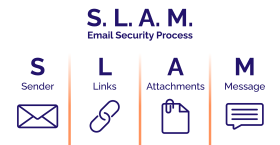
That’s where the SLAM method comes in. SLAM is a quick, easy-to-remember approach that helps you slow down, spot warning signs, and make safer decisions before clicking a link, opening an attachment, or responding to an email.
No technical expertise required. Just a simple habit that we can all use to help keep our organizations secure.
SLAM: a simple way to review emails

S – Sender
- Do you recognize the sender?
- Does the email address match the name?
Why it’s important: Attackers often use addresses that look like real ones at first glance.
L – Links
- Hover over links before clicking
- Do they lead where you expect?
Why it’s important: Suspicious links can take you to websites designed to collect your information.
A – Attachments
- Were you expecting the file?
- Does the file type make sense?
Why it’s important: Attachments can carry malware or harmful software.

M – Message
- Does the message feel rushed, urgent, or unusual?
- Are there spelling mistakes or odd wording?
Why it’s important: Phishing emails often try to create pressure to compel you to act quickly.
Why this matters for your organization
For teams with multiple staff and systems, one email can affect more than one person. It can impact access to files, systems, and sensitive information.
Email security is not just an IT issue. It’s a shared responsibility across the organization.
Other ways to lower risk
- Talk about email safety as a team so everyone knows what to look for
- Set up basic protections like spam filters and multi-factor authentication
- Keep systems and security tools up to date
- Encourage your team to pause and double check when something feels off
Using the SLAM method may feel too simple to make a difference. It's not! It's a smart way to keep your systems, data, and everyday work safer.
By making secure email habits part of your routine and sharing these tips with your team, you're helping protect your whole organization from cyber threats.
Try chatting about these practices at your next team meeting or send this blog around to your colleagues. When we all pay attention to email safety, it becomes second nature and keeps our work, data, and systems secure.
Want to strengthen your organization's cybersecurity habits?
IT Horizons helps businesses, non-profits, and organizations across Canada improve security with practical, people-focused solutions. Contact us to learn how we can help assess your risks, strengthen your systems, and support your team with ongoing IT guidance.
We also offer phishing simulations, which is an excellent way to support training your team. The best way to learn is real life practice.
Contact us to learn how we can help assess your risks, training your team, strengthen your systems, and support you with ongoing IT guidance.
This email address is being protected from spambots. You need JavaScript enabled to view it.Contact | IT Horizons
780-833-2566